
✦ Signature Fine-Art Case Study • Complete PSD & Bonus Pack
Creative Artistic Photo Editing: “TIMISOARA” Video Tutorial
Step behind the layers of my expressive “TIMISOARA” fine-art portrait. Across 11 focused chapters (approx. 38 minutes total), learn how accessible Adobe Photoshop tools, layered textures, and rich atmospheric color grading elevate a raw capture into gallery-grade art—complete with the working PSD file and a FREE bonus Texture Pack.
$99 USD
• Full Tutorial + Layered PSD + Free Texture Pack
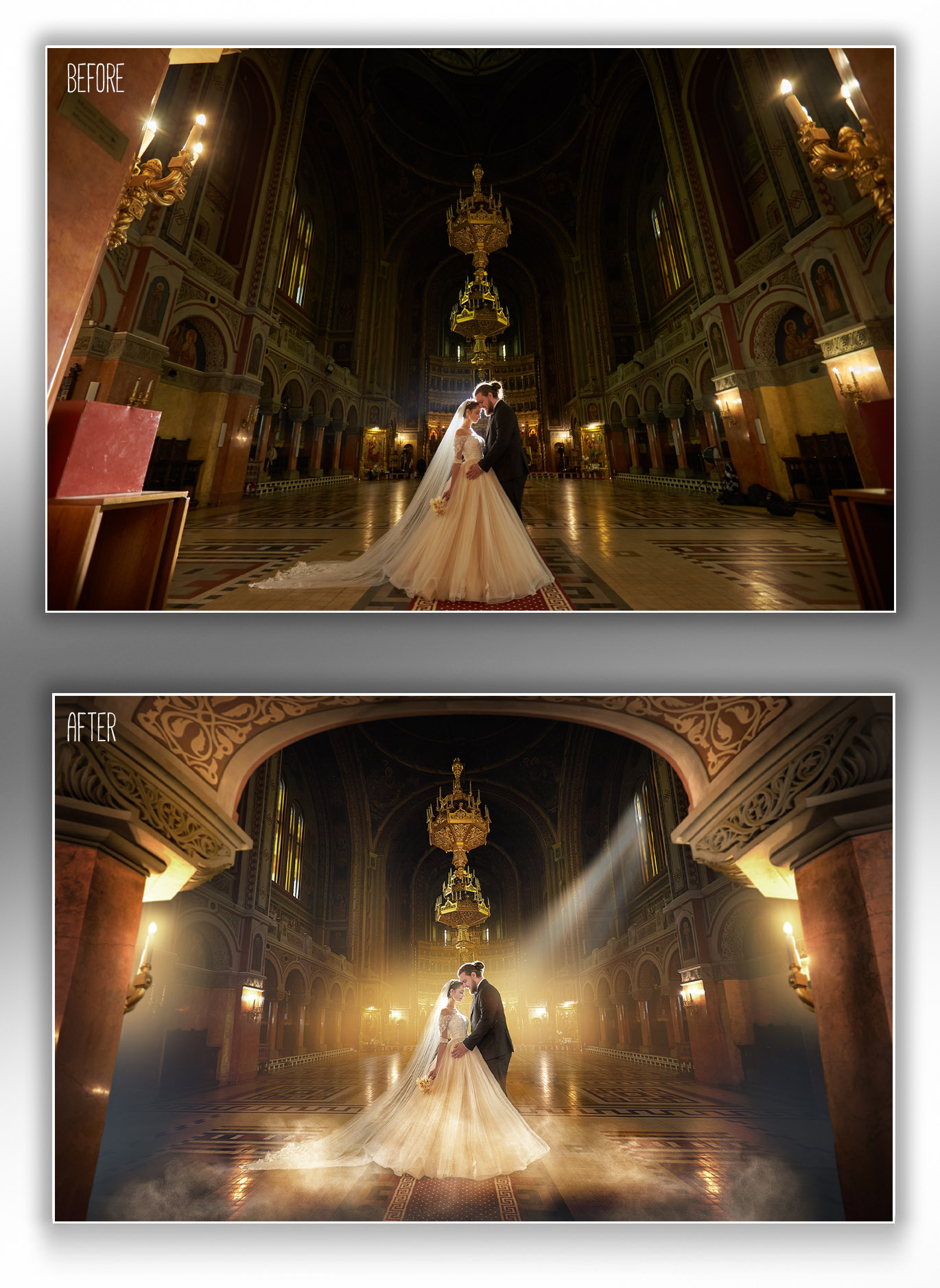
Complete post-production breakdown of “TIMISOARA” — from raw capture to painterly fine-art finish
Included: Video + PSD + Bonus Textures
Complete Learning Package
Everything You Receive & Multi-Tutorial Savings
Included In Your Purchase
- Full HD “TIMISOARA” Video Tutorial: 38 minutes of clear, real-time editing split into 11 structured, easy-to-follow chapters.
- FREE Bonus High-Res Texture Pack: Receive an entire fine-art texture pack at no extra cost to use on your own client work.
- Original Working PSD File: Open the exact master file in Photoshop with every mask, blend mode, and adjustment layer intact.
Pricing & Bundle Offers
- Single “TIMISOARA” Tutorial — $99 USD: Includes the 11-chapter video, working PSD file, and 1 FREE Bonus Texture Pack.
- 3-Tutorial Bundle — $249 USD: Choose any 3 full editing tutorials and save $48 (tutorials & PSDs only).
- 5-Tutorial Bundle — $399 USD: Choose any 5 full editing tutorials and save $96 (tutorials & PSDs only).
Inside The 11 Chapters
What You Will Master in the “TIMISOARA” Workflow
01
11 Structured Step-by-Step Chapters (~38 Minutes Total)
Every stage of the artistic transformation is divided into 11 focused, real-time lessons with zero guesswork—easy to pause, practice, and revisit anytime.
02
Painterly Texture Integration & Atmospheric Depth
Learn how to weave fine-art textures seamlessly across backdrops, light falloff, and shadows while keeping skin tones luminous and authentic.
03
Simple Photoshop Tools, Signature Editorial Color Grading
Master clean, repeatable post-processing workflows using standard Photoshop adjustments, masks, and tonal curves built for both beginners and working pros.
04
Hands-On Layer Inspection With the Master PSD & Bonus Textures
Open the included working PSD file in Adobe Photoshop to examine every curve, opacity setting, and texture blend mode directly on your screen.
Watch Trailer
“TIMISOARA” Video Tutorial Preview
Questions & Answers
Frequently Asked Questions
📂 Is the original PSD file really included with all layers?
Yes! You receive the complete working Adobe Photoshop PSD file with all adjustment layers, masks, and textures intact—plus a FREE Bonus Texture Pack when purchasing the single “TIMISOARA” tutorial ($99 USD).
🎓 Is this tutorial suitable if I am not a Photoshop expert?
Absolutely. The workflow relies on clean, straightforward Photoshop tools explained step-by-step across 11 short chapters, making it easy to follow for both beginners and experienced photographers.
⏱️ How quickly will I receive the tutorial, PSD, and bonus textures?
Download links are sent to your email promptly after payment confirmation so you can start watching and exploring the PSD layers right away.
$99 USD
• “TIMISOARA” Tutorial + Master PSD + Free Texture Pack
🔒 Secure Checkout
•
💳 Card & Instant Payment
•
🎁 Free Texture Pack Included
🛒 Select a payment method: